    public static void main(String[] args) throws FileNotFoundException {
        countLinesOfCodeInFolder("D:\\Dev\\actio_parser\\java\\Parser\\src");
    }

    private static void countLinesOfCodeInFolder(final String folderPath) throws FileNotFoundException {
        long totalLineCount = 0;
        final List folderList = new LinkedList<>();
        folderList.add(new File(folderPath));
        while (!folderList.isEmpty()) {
            final File folder = folderList.remove(0);
            if (folder.isDirectory() && folder.exists()) {
                System.out.println("Scanning " + folder.getName());
                final File[] fileList = folder.listFiles();
                for (final File file : fileList) {
                    if (file.isDirectory()) {
                        folderList.add(file);
                    } else if (file.getName().endsWith(".java")
                            || file.getName().endsWith(".sql")) {
                        long lineCount = 0;
                        final Scanner scanner = new Scanner(file);
                        while (scanner.hasNextLine()) {
                            scanner.nextLine();
                            lineCount++;
                        }
                        totalLineCount += lineCount;
                        final String lineCountString;
                        if (lineCount > 99999) {
                            lineCountString = "" + lineCount;
                        } else {
                            final String temp = ("     " + lineCount);
                            lineCountString = temp.substring(temp.length() - 5);
                        }
                        System.out.println(lineCountString + " lines in " + file.getName());
                    }
                }
            }
        }
        System.out.println("Scan Complete: " + totalLineCount + " lines total");
    }
Friday, March 18, 2016
Count All Lines of Java Code
I posted this to StackOverflow but I think it also belongs here.

Friday, August 21, 2015
WindowFocusListener for a JInternalFrame
UPDATE: [[ If you're curious, refreshing the window on focus did not work well for me. They would double-click on a table in an out-of-focus window, the table would refresh on focus, and the double click event would fire against a different record than the one upon which the original click was made. ]]
Here's an example focus listener for a JInternalFrame:

package com.apexroot.sandbox;

import java.awt.Dimension;
import java.awt.EventQueue;
import java.beans.PropertyChangeEvent;
import java.beans.PropertyChangeListener;
import javax.swing.JDesktopPane;
import javax.swing.JFrame;
import javax.swing.JInternalFrame;
import javax.swing.JLabel;

/**
 * author grants unlimited license to modify, reuse and redistribute. based on
 * the suggestion by @mKorbel on stackoverflow at
 * http://stackoverflow.com/questions/7219860/jinternalframe-selection
 * please keep a URL to the original version in the source code.
 * http://javajon.blogspot.com/2015/08/windowfocuslistener-for-jinternalframe.html
 *
 * @author Apexroot
 */
public class InternalFrameFocusListenerExample {

    public static final String INTERNAL_FRAME_FOCUS_EVENT_PROPERTY = "selected";

    public static void main(String[] args) {
        EventQueue.invokeLater(new Runnable() {
            @Override
            public void run() {

                final JFrame jFrame = new JFrame();
                final JDesktopPane jDesktopPane = new JDesktopPane();
                final JInternalFrame[] jInternalFrames = new FocusInternalFrame[3];
                for (int i = 0; i < jInternalFrames.length; i++) {
                    jInternalFrames[i] = new FocusInternalFrame();
                }
                jFrame.dispose();
                jFrame.setContentPane(jDesktopPane);
                jDesktopPane.setPreferredSize(new Dimension(400, 200));
                jFrame.pack();
                jFrame.setVisible(true);
                for (int i = 0; i < jInternalFrames.length; i++) {
                    jDesktopPane.add(jInternalFrames[i]);
                    jInternalFrames[i].setLocation(10 + 60 * i, 10 + 40 * i);
                    jInternalFrames[i].setVisible(true);
                }

            }

        });

    }

    public static class FocusInternalFrame extends JInternalFrame {

        public FocusInternalFrame() {

            final JLabel jLabel = new JLabel("placeholder for pack();");
            setContentPane(jLabel);
            pack();

            this.addPropertyChangeListener(
                    INTERNAL_FRAME_FOCUS_EVENT_PROPERTY,
                    new LabelFocusListener(jLabel));

        }

    }

    private static class LabelFocusListener implements PropertyChangeListener {

        private final JLabel jLabel;

        public LabelFocusListener(JLabel jLabel) {
            this.jLabel = jLabel;
        }

        @Override
        public void propertyChange(PropertyChangeEvent evt) {
            // please keep a URL to the original version in the source code.
            // http://javajon.blogspot.com/2015/08/windowfocuslistener-for-jinternalframe.html
            if (INTERNAL_FRAME_FOCUS_EVENT_PROPERTY.equals(
                    evt.getPropertyName())) {
                final Object oldValue = evt.getOldValue();
                final Object newValue = evt.getNewValue();
                if (oldValue instanceof Boolean
                        && newValue instanceof Boolean) {
                    boolean wasInFocus = (Boolean) oldValue;
                    boolean isInFocus = (Boolean) newValue;
                    if (isInFocus && !wasInFocus) {
                        EventQueue.invokeLater(new Runnable() {
                            @Override
                            public void run() {

                                // focus gained
                                jLabel.setText("focus gained");
                            }
                        });
                    } else if (wasInFocus && !isInFocus) {
                        EventQueue.invokeLater(new Runnable() {
                            @Override
                            public void run() {

                                // focus lost
                                jLabel.setText("focus lost");
                            }
                        });
                    }
                }
            }
        }
    }
}
Wednesday, July 30, 2014
Java Swing "Flash" a Component
One line of code:
new ComponentFlasher().flashNow(myTextField); // works on buttons too
Sometimes people need help finding messages on screen, or seeing data that has changed. The above code will change the color of the text in the text field myTextField to red, then quickly fade it back to black.
ComponentFlasher.java :
import java.awt.Color;
import java.awt.event.ActionEvent;
import java.awt.event.ActionListener;
import java.util.LinkedList;
import java.util.List;
import javax.swing.JComponent;
import javax.swing.SwingUtilities;
import javax.swing.Timer;

// Please feel free to reuse, modify and distribute.
// Please add your own url or email address to this list:
//
// - http://javajon.blogspot.com/
//

/**
 * Class to make it easy to flash a component.
 */
public class ComponentFlasher {

    private final List flashQueue = new LinkedList();
    private final Object FLASH_LOCK = new Object();
    private volatile JComponent flashCurrent = null;
    private final FlashTimer flashTimer = new FlashTimer();
    private final int maxQueueSize = 3;

    public void flashQueue(JComponent componentToAddToQueue) {
        synchronized (FLASH_LOCK) {
            if (flashCurrent == componentToAddToQueue) {
                flashReset(componentToAddToQueue);
            } else {
                final boolean restartTimer = flashQueue.isEmpty() && (flashCurrent == null);
                flashQueue.remove(componentToAddToQueue);
                flashQueue.add(componentToAddToQueue);
                if (restartTimer) {
                    flashTimer.start();
                }
            }
        }
    }

    public void flashNow(final JComponent componentToFlashNow) {
        synchronized (FLASH_LOCK) {
            if (flashCurrent != componentToFlashNow) {
                final boolean restartTimer;
                if (flashCurrent != null) {
                    final JComponent componentToPutBackIntoTheQueue = flashCurrent;
                    flashQueue.remove(componentToPutBackIntoTheQueue);
                    flashQueue.add(0, componentToPutBackIntoTheQueue);

                    SwingUtilities.invokeLater(new Runnable() {
                        @Override
                        public void run() {
                            componentToPutBackIntoTheQueue.setForeground(Color.BLACK);
                        }
                    });

                    restartTimer = false;
                } else {
                    restartTimer = flashQueue.isEmpty();
                }
                flashCurrent = componentToFlashNow;
                if (restartTimer) {
                    flashTimer.start();
                }
            }
            flashReset(componentToFlashNow);
        }
    }

    private void flashReset(final JComponent componentToFlashNow) {
        SwingUtilities.invokeLater(new Runnable() {
            @Override
            public void run() {
                componentToFlashNow.setForeground(Color.RED);
            }
        });
    }

    private void flashIteration(final JComponent componentToFlash) {
        // run this code on the UI thread
        SwingUtilities.invokeLater(new Runnable() {
            @Override
            public void run() {
                // find out how red we still are
                final int red = flashCurrent.getForeground().getRed() - 10;
                if (red > 0) {
                    componentToFlash.setForeground(new Color(red, 0, 0));
                } else {
                    synchronized (FLASH_LOCK) {
                        if (flashCurrent == componentToFlash) {
                            flashCurrent = null;
                        }
                    }
                }
            }
        });
    }

    private void checkQueue() {
        // no current component - check queue
        if (!flashQueue.isEmpty()) {
            synchronized (FLASH_LOCK) {
                // recheck the same flags we just checked
                // now that we have the lock we are sure they won't change.
                if (flashCurrent == null) {
                    if (flashQueue.isEmpty()) {
                        // stop the timer
                        flashTimer.stop();
                    } else {
                        // make the next item current
                        while (flashQueue.size() > (maxQueueSize + 1)) {
                            flashQueue.remove(0);
                        }
                        final JComponent next = flashQueue.remove(0);
                        flashCurrent = next;
                        flashReset(next);
                    }
                }
            }
        }
    }

    private class FlashTimer extends Timer {

        public FlashTimer() {
            super(50, new FlashTimerAction());
        }
    }

    private class FlashTimerAction implements ActionListener {

        public FlashTimerAction() {
        }

        @Override
        public void actionPerformed(ActionEvent e) {
            // is there a current component ?
            if (flashCurrent == null) {
                checkQueue();
            } else {
                // current component - copy to send to anon-implementation Runnable
                flashIteration(flashCurrent);
            }
        }
    }
}
Wednesday, July 23, 2014
Easy Right-Click Menus for Any Java Swing Application
Add right mouse click (Select All, Copy, Paste) to an entire Java Swing application in one line of code. Sound too good to be true? Before you load your first screen:
new RightMouseMenuMaker().start();

// load your first frame, window, or swingworker here.
Add the above line of code and the following file to your project and you're done.
RightMouseMenuMaker.java :
import java.awt.AWTEvent; import java.awt.Component; import java.awt.Container; import java.awt.Toolkit; import java.awt.event.AWTEventListener; import java.awt.event.ActionEvent; import java.awt.event.ContainerEvent; import java.awt.event.ContainerListener; import java.awt.event.KeyEvent; import java.util.ArrayList; import java.util.concurrent.BlockingQueue; import java.util.concurrent.LinkedBlockingDeque; import java.util.concurrent.TimeUnit; import java.util.logging.Level; import java.util.logging.Logger; import javax.swing.JMenuItem; import javax.swing.JPopupMenu; import javax.swing.SwingUtilities; import javax.swing.text.JTextComponent; import javax.swing.text.TextAction; /** * Library code to add RIGHT-CLICK menus to a Java Swing desktop application. * usage:new RightMouseMenuMaker().start();* * @author javajon.blogspot.com */ public class RightMouseMenuMaker implements AWTEventListener, ContainerListener { private boolean enabled = true; /** * register this event listener as a global event listener. */ public void start() { Toolkit.getDefaultToolkit().addAWTEventListener(this, -1L); } /** * * @return the enabled state */ public boolean isEnabled() { return enabled; } /** * enable or disable this event listener. * * @param enabled */ public void setEnabled(boolean enabled) { this.enabled = enabled; } /** * @see java.awt.event.AWTEventListener * @param event */ @Override public void eventDispatched(AWTEvent event) { if (!this.enabled) { return; } if (event instanceof ContainerEvent) { ContainerEvent ce = (ContainerEvent) event; if (ce.getID() == ContainerEvent.COMPONENT_ADDED) { componentAdded(ce); } } } /** * @see java.awt.event.ContainerListener * @param ce */ @Override public void componentAdded(ContainerEvent ce) { final Component child = ce.getChild(); addRightMouseContextMenus(child); } /** * @see java.awt.event.ContainerListener * @param ce */ @Override public void componentRemoved(ContainerEvent e) { } /** * queue to allow the right mouse menus to be added on a background thread * after the screen has been displayed. on larger screens with numerous * controls, adding the right menu click to each component may take some * time. */ private static final BlockingQueuecomponentsWaitingForRightMouseMenus = new LinkedBlockingDeque<>(); /** * background thread to add the right mouse menus after the screen has been * displayed. on larger screens with numerous controls, adding the right * menu click to each component may take some time. */ private static final Thread rightMouseMenuMakerThread = new Thread(new ComponentQueue(), "Right Mouse Menu Maker"); /** * start the background thread as soon as the first instance of this class * is created. */ static { rightMouseMenuMakerThread.start(); } /** * adds a right mouse menu to a component and any child components. * @param component */ public static void addRightMouseContextMenus(Component component) { try { componentsWaitingForRightMouseMenus.put(component); } catch (InterruptedException ex) { Logger.getLogger(RightMouseMenuMaker.class.getName()) .log(Level.SEVERE, null, ex); } } /** * adds a right mouse menu to a component and any child components. * @param component */ private static void addRightMouseContextMenusPrivate(Component component) { if (component instanceof JTextComponent) { JTextComponent textComponent = (JTextComponent) component; final JPopupMenu existingContextMenu = textComponent.getComponentPopupMenu(); if (existingContextMenu == null) { final JPopupMenu newContextMenu = getContextMenu(textComponent); textComponent.setComponentPopupMenu(newContextMenu); } } if (component instanceof Container) { Container container = (Container) component; for (Component c : container.getComponents()) { addRightMouseContextMenusPrivate(c); } } } /** * creates a right mouse menu for any JTextComponent. * @return right mouse menu * @see javax.swing.text.JTextComponent * @param textComponent */ public static JPopupMenu getContextMenu( final JTextComponent textComponent) { JMenuItem menuItem; // menu container final JPopupMenu rightClickMenu; rightClickMenu = new JPopupMenu("Edit"); // ----------- final TextAction selectAllAction = new TextAction("Select All") { @Override public void actionPerformed(ActionEvent e) { textComponent.selectAll(); if (getFocusedComponent() != textComponent) { textComponent.grabFocus(); } } }; menuItem = new JMenuItem(selectAllAction); menuItem.setMnemonic(KeyEvent.VK_A); rightClickMenu.add(menuItem); // ----------- rightClickMenu.addSeparator(); // ----------- final TextAction cutAction = new TextAction("Cut") { @Override public void actionPerformed(ActionEvent e) { final String selectedText = textComponent.getSelectedText(); if (selectedText == null || "".equals(selectedText)) { textComponent.selectAll(); } textComponent.cut(); if (getFocusedComponent() != textComponent) { textComponent.grabFocus(); } } }; menuItem = new JMenuItem(cutAction); menuItem.setMnemonic(KeyEvent.VK_T); rightClickMenu.add(menuItem); // ----------- rightClickMenu.addSeparator(); // ----------- final TextAction copyAction = new TextAction("Copy") { @Override public void actionPerformed(ActionEvent e) { final String selectedText = textComponent.getSelectedText(); if (selectedText == null || "".equals(selectedText)) { textComponent.selectAll(); } textComponent.copy(); if (getFocusedComponent() != textComponent) { textComponent.grabFocus(); } } }; menuItem = new JMenuItem(copyAction); menuItem.setMnemonic(KeyEvent.VK_C); rightClickMenu.add(menuItem); // ----------- final TextAction copyAllAction = new TextAction(" Copy All") { @Override public void actionPerformed(ActionEvent e) { textComponent.selectAll(); textComponent.copy(); if (getFocusedComponent() != textComponent) { textComponent.grabFocus(); } } }; menuItem = new JMenuItem(copyAllAction); menuItem.setFont(menuItem.getFont() .deriveFont(menuItem.getFont().getSize2D() * 0.75f)); menuItem.setMnemonic(KeyEvent.VK_O); rightClickMenu.add(menuItem); // ----------- rightClickMenu.addSeparator(); // ----------- final TextAction pasteIntoAction = new TextAction("Paste") { @Override public void actionPerformed(ActionEvent e) { textComponent.paste(); if (getFocusedComponent() != textComponent) { textComponent.grabFocus(); } } }; menuItem = new JMenuItem(pasteIntoAction); menuItem.setMnemonic(KeyEvent.VK_P); rightClickMenu.add(menuItem); // ----------- final TextAction pasteReplaceAllAction = new TextAction(" Replace All") { @Override public void actionPerformed(ActionEvent e) { textComponent.selectAll(); textComponent.paste(); if (getFocusedComponent() != textComponent) { textComponent.grabFocus(); } } }; menuItem = new JMenuItem(pasteReplaceAllAction); menuItem.setFont(menuItem.getFont() .deriveFont(menuItem.getFont().getSize2D() * 0.75f)); menuItem.setMnemonic(KeyEvent.VK_O); rightClickMenu.add(menuItem); // ----------- final TextAction pasteInsertAtStartAction = new TextAction(" Insert at Start") { @Override public void actionPerformed(ActionEvent e) { textComponent.select(0, 0); textComponent.paste(); textComponent.select(0, 0); if (getFocusedComponent() != textComponent) { textComponent.grabFocus(); } } }; menuItem = new JMenuItem(pasteInsertAtStartAction); menuItem.setFont(menuItem.getFont() .deriveFont(menuItem.getFont().getSize2D() * 0.75f)); menuItem.setMnemonic(KeyEvent.VK_B); rightClickMenu.add(menuItem); // ----------- final TextAction pasteAppendAtEndAction = new TextAction(" Append at End") { @Override public void actionPerformed(ActionEvent e) { final String text = textComponent.getText(); if (text == null) { textComponent.select(0, 0); } else { final int length = text.length(); textComponent.select(length, length); } textComponent.paste(); if (getFocusedComponent() != textComponent) { textComponent.grabFocus(); } } }; menuItem = new JMenuItem(pasteAppendAtEndAction); menuItem.setFont(menuItem.getFont() .deriveFont(menuItem.getFont().getSize2D() * 0.75f)); menuItem.setMnemonic(KeyEvent.VK_E); rightClickMenu.add(menuItem); return rightClickMenu; } static class ComponentQueue implements Runnable { public ComponentQueue() { } @Override public void run() { try { while (true) { final ArrayList arrayList = new ArrayList (); // block the thread -- wait until there is a component arrayList.add(componentsWaitingForRightMouseMenus.take()); componentsWaitingForRightMouseMenus.drainTo(arrayList); // short delay -- any more components right away? while (true) { final Component maybe = componentsWaitingForRightMouseMenus .poll(500L, TimeUnit.MILLISECONDS); if (maybe == null) { break; } else { arrayList.add(maybe); componentsWaitingForRightMouseMenus .drainTo(arrayList); } } // marshall the list of components to the UI thread // for further processing SwingUtilities.invokeLater(new Runnable() { @Override public void run() { for (final Component component : arrayList) { addRightMouseContextMenusPrivate(component); } } }); } } catch (InterruptedException ex) { Logger.getLogger(RightMouseMenuMaker.class.getName()) .log(Level.SEVERE, null, ex); } } } }
Friday, July 18, 2014
Java Desktop (e.g. Swing) Network Deployment Batch File
Most networks are fast enough these days to run your JAR right from the network share, but file locking makes deployment difficult with multiple users.
This batch file checks the network location for a newer versions of the JAR file and lib/ folder, and updates the local copy only if a newer copy is available. Then the latest copy is executed locally.
Network-Java-App-Deploy.bat
This batch file checks the network location for a newer versions of the JAR file and lib/ folder, and updates the local copy only if a newer copy is available. Then the latest copy is executed locally.
Network-Java-App-Deploy.bat
@echo off

rem JAR file and installation folder (no trailing slashes):
set jar_file=myjavaprogram.jar
set dist_dir=\\server\share\folder

rem users should have read/write access to this folder:
set inst_dir=%appdata%\%jar_file%

rem customize the text to appear in the command window title bar
title Java Application Updater
cls

echo.
echo Java Application Updater
echo.
echo Please feel free to use, reuse, modify, reproduce and distribute.
echo Code is as-is, without warrantee.  User assumes all liability for use.
echo.
echo JAR:   %jar_file%
echo FROM:  %dist_dir%
echo TO:    %inst_dir%
echo.
echo Close the window to cancel . . .
pause

echo.
echo when redistributing, please keep the following URLs
echo here in the code, so that other's may see the sources
echo and the versions of this batch file:
echo.
echo  - http://javajon.blogspot.com/
echo.

echo.
echo verify %inst_dir%, %username%, temp and lib ...
mkdir "%inst_dir%"
mkdir "%inst_dir%\%username%"
mkdir "%inst_dir%\%username%\temp"
mkdir "%inst_dir%\%username%\lib"

echo.
echo copy application jar file:  %username%\%jar_file% ...
xcopy /D/C/H/R/I/F/K/Y/V "%dist_dir%\%jar_file%" "%inst_dir%\%username%\"

echo.
echo copy lib folder:  %username%\lib ...
xcopy /D/C/H/R/I/F/K/Y/E/V "%dist_dir%\lib\*.*" "%inst_dir%\%username%\lib\"
echo.

cd /D "%inst_dir%\%username%"
cd "%inst_dir%\%username%"
start %jar_file%

goto :skip_xcopy_switches_explanation

 These are the XCOPY command line switches we are using:

  single: /D/C/H/R/I/F/K/Y/V
  folder: /D/C/H/R/I/F/K/Y/E/V

 These are the above switches briefly described:

  /D - Copy files that are newer than the destination files
  /C - Continue even on error
  /H - Copy hidden and system files, too
  /R - Overwrite read-only files
  /I - Copies more than one file to destination
    (assumes destination is a directory)
  /F - Displays full path and destination while copying files
  /K - Copies attributes (as opposed to resetting read-only attributes)
  /Y - Copy without confirming replacement of existing files
  /E - Copies any subdirectories, even if they are empty
  /V - Verifies each file as it is written to the destination file

:skip_xcopy_switches_explanation
Add JMenuItem to JMenu after the menu has already been displayed to the user.
How I would do it ...

Temporarily disable new menus to prevent accidental clicks ...

MyMenuListener - How to use it:
MyMenuListener - The code: (as a single executable java file)
Temporarily disable new menus to prevent accidental clicks ...
MyMenuListener - How to use it:
        fileMenu.addMenuListener(new MyMenuListener(fileMenu) {

            @Override
            protected void quickMenu(MyMenuListener.MyMenuWorker menuWorker) {

                menuWorker.add(new JMenuItem("Fast New Menu A"));
                menuWorker.add(new JMenuItem("Fast New Menu B"));

            }

            @Override
            protected void slowMenu(MyMenuListener.MyMenuWorker menuWorker) {

                /** do something here that takes a long time. */

                menuWorker.add(new JMenuItem("Delayed Menu 1"));
                menuWorker.add(new JMenuItem("Delayed Menu 2"));

            }
        });
MyMenuListener - The code: (as a single executable java file)
import java.awt.Dimension;
import java.awt.event.ActionEvent;
import java.awt.event.ActionListener;
import java.util.ArrayList;
import java.util.List;
import java.util.concurrent.ExecutionException;
import java.util.logging.Level;
import java.util.logging.Logger;
import javax.swing.JMenu;
import javax.swing.JMenuItem;
import javax.swing.JPopupMenu;
import javax.swing.SwingUtilities;
import javax.swing.SwingWorker;
import javax.swing.Timer;
import javax.swing.event.MenuEvent;
import javax.swing.event.MenuListener;

/**
 * Demonstrates how to add menu items to a menu, dynamically on a background
 * thread using a SwingWorker, after the menu has already been displayed on
 * screen.
 *
 * @author javajon.blogspot.com
 */
public class SwingWorkerMenuBar extends javax.swing.JFrame {

    private javax.swing.JMenu fileMenu;

    /**
     * Creates new form SwingWorkerMenuBar. (yay?)
     */
    public SwingWorkerMenuBar() {
        initComponents();

        /**
         * this part is required for the menu to be dynamic.
         */
        fileMenu.addMenuListener(new MyMenuListener(fileMenu) {

            /**
             * This is the part that catches the menu just before it's displayed
             * so we can make immediate modifications. Any modifications you can
             * make from memory (i.e. without hitting a database or a file
             * system) can be made here and will display with the menu the first
             * time it becomes visible. Caution: if you put your
             * long-running code here then the menu won't show up at all until
             * your long-running code is done.
             */
            @Override
            protected void quickMenu(MyMenuListener.MyMenuWorker menuWorker) {

                menuWorker.add(new JMenuItem("Fast New Menu A"));
                menuWorker.add(new JMenuItem("Fast New Menu B"));

            }

            /**
             * this is where we add menus that might take some time to build ie
             * data has to be looked up in the database or read from a file
             * store or network share.
             */
            @Override
            protected void slowMenu(MyMenuListener.MyMenuWorker menuWorker) {
                for (int i = 500; i >= 50; i = (i / 33) * 25) {
                    try {

                        // simulate processing & send a new menu to UI
                        Thread.sleep(i);
                        menuWorker.add(new JMenuItem("New Menu " + i + " Delay"));

                    } catch (InterruptedException ex) {
                        Logger.getLogger(SwingWorkerMenuBar.class.getName()).log(Level.SEVERE, null, ex);
                    }
                }
            }
        });

    }

    public static abstract class MyMenuListener implements MenuListener, ActionListener {

        /**
         * This is the part that catches the menu just before it's displayed so
         * we can make immediate modifications. Any modifications you can make
         * from memory (i.e. without hitting a database or a file system) can be
         * made here and will display with the menu the first time it becomes
         * visible. Caution: if you put your long-running code here then
         * the menu won't show up at all until your long-running code is done.
         *
         * @param menuWorker use this object to add new menus
         */
        protected abstract void quickMenu(MyMenuWorker menuWorker);

        /**
         * this is where we add menus that might take some time to build ie data
         * has to be looked up in the database or read from a file store or
         * network share.
         *
         * @param menuWorker use this object to add new menus
         */
        protected abstract void slowMenu(MyMenuWorker menuWorker);

        /**
         * the menu with which this listener is associated.
         */
        private final JMenu menu;

        /**
         * the menus that have been created using menuWorker.add(menuItem).
         */
        private final List myMenus = new ArrayList();

        /**
         * the menus that have been disabled to prevent the user from
         * accidentally clicking on a menu that wasn't there a moment ago.
         */
        private final List menusToEnable = new ArrayList();

        /**
         * basic lock object to make sure threads are playing nice with shared
         * memory.
         */
        private final Object LOCK = new Object();

        /**
         * this is the part that re-enables menu options.
         */
        private final javax.swing.Timer timer = new Timer(300, this);

        /**
         * constructor.
         * @param menu
         */
        public MyMenuListener(final JMenu menu) {
            this.menu = menu;
        }

        /**
         * this happens when the user clicks the menu, but before the pop up
         * menu appears.
         * @param e
         */
        @Override
        public void menuSelected(MenuEvent e) {
            new MyMenuWorker(menu).execute();
        }

        @Override
        public void menuDeselected(MenuEvent e) {

        }

        @Override
        public void menuCanceled(MenuEvent e) {

        }

        /**
         * background worker that can do long-running tasks such as database
         * queries and then add more menu options to the list after the list has
         * already been displayed.
         */
        public class MyMenuWorker extends SwingWorker {

            private boolean quick;
            private int insertAt = 0;
            private final JMenu menu;

            public MyMenuWorker(JMenu menu) {
                synchronized (LOCK) {
                    this.menu = menu;

                    // clear out menus that were added last time
                    for (int i = 0; i < menu.getItemCount(); i++) {
                        final JMenuItem menuItem = menu.getItem(i);
                        if (menuItem != null && myMenus.contains(menuItem)) {
                            if (myMenus.remove(menuItem)) {
                                menu.remove(menuItem);
                                i--;
                            }
                        }
                    }

                    // add instant menus
                    this.quick = true;
                }
                quickMenu(this);
                synchronized (LOCK) {
                    this.insertAt = menu.getItemCount(); // end of list
                }
            }

            @Override
            protected Boolean doInBackground() throws Exception {
                synchronized (LOCK) {
                    this.quick = false;
                }
                slowMenu(this);
                return null;
            }

            /**
             * add menu items after the menu has already been shown. these are
             * the menu items that are published above using publish().
             *
             * @param menuItems menu items to add
             */
            @Override
            protected void process(List menuItems) {
                final int originalInsert = insertAt;
                for (final JMenuItem item : menuItems) {
                    myMenus.add(item);
                    menu.add(item, insertAt++);
                }
                tempDisable(menu, originalInsert);
                resizeMenu();
            }

            /**
             * feel free to reuse, modify, or distribute.
             * http://javajon.blogspot.com/
             */
            private void resizeMenu() {
                final JPopupMenu popupMenu = menu.getPopupMenu();
                if (popupMenu.isVisible()) {

                    // redraw the menu
                    menu.revalidate();

                    // resize the menu
                    popupMenu.setVisible(false);
                    popupMenu.setVisible(true);

                }
            }

            /**
             * report errors.
             */
            @Override
            protected void done() {
                try {
                    get();
                } catch (InterruptedException ex) {
                    Logger.getLogger(SwingWorkerMenuBar.class.getName()).log(Level.INFO, null, ex);
                } catch (ExecutionException ex) {
                    Logger.getLogger(SwingWorkerMenuBar.class.getName()).log(Level.INFO, null, ex);
                }
            }

            /**
             * when called from quickMenu() this method
             *
             * @param item
             */
            void add(JMenuItem item) {
                if (quick) {
                    myMenus.add(menu.add(item));
                } else {
                    publish(item);
                }
            }

        }

        /**
         * temporarily disables menu options because they are changing and you
         * don't want the user to click and have the menu option change just
         * before the click is made.
         *
         * @param menu
         * @param firstIndex
         */
        private void tempDisable(
                final JMenu menu,
                final int firstIndex) {

            synchronized (LOCK) {
                int insertAt = 0;
                for (int i = firstIndex; i < menu.getItemCount(); i++) {
                    final JMenuItem menuItem = menu.getItem(i);
                    if (menuItem.isEnabled()) {
                        menuItem.setEnabled(false);
                        if (!menusToEnable.contains(menuItem)) {
                            menusToEnable.add(insertAt++, menuItem);
                        }
                    }
                }

                timer.start();
            }

        }

        /**
         * this is the code that re-enables menus when they have been disabled
         * to prevent accidental clicking. this is the ActionListener
         * implementation for the timer task.
         *
         * @param e
         */
        @Override
        public void actionPerformed(ActionEvent e) {

            synchronized (LOCK) {
                if (menusToEnable.isEmpty()) {

                    /**
                     * if there's nothing to do, kill the timer.
                     */
                    timer.stop();

                } else {

                    /**
                     * re-enable the menus.
                     */
                    SwingUtilities.invokeLater(new Runnable() {
                        @Override
                        public void run() {
                            synchronized (LOCK) {
                                if (!menusToEnable.isEmpty()) {
                                    // enable the first menu that's disabled
                                    for (int i = 0; i < menu.getItemCount(); i++) {
                                        final JMenuItem enableMe = menu.getItem(i);
                                        if (menusToEnable.contains(enableMe)) {
                                            // enable one custom menu and quit
                                            enableMe.setEnabled(true);
                                            enableMe.revalidate();
                                            menusToEnable.remove(enableMe);
                                            break;
                                        }
                                    }
                                }
                            }
                        }
                    });

                } // empty / kill timer
            } // synchronized
        }

    }

    /**
     * create a simple form with a file menu.
     */
    private void initComponents() {
        setDefaultCloseOperation(javax.swing.WindowConstants.EXIT_ON_CLOSE);

        /**
         * simulate a file menu with a single menu option on it.
         */
        final javax.swing.JMenuBar menuBar;
        setJMenuBar(menuBar = new javax.swing.JMenuBar());
        menuBar.add(this.fileMenu = new javax.swing.JMenu("File"));
        fileMenu.add("Existing Menu I");
        fileMenu.add("Existing Menu II");

        /**
         * form content, form size (i think), and center on screen.
         */
        getContentPane().setPreferredSize(new Dimension(400, 260));
        pack();
        setLocationRelativeTo(null);

    }

    /**
     * default program entry point -- generated by NetBeans.
     *
     * @param args the command line arguments
     */
    public static void main(String args[]) {

        /* Create and display the form */
        java.awt.EventQueue.invokeLater(new Runnable() {
            public void run() {
                new SwingWorkerMenuBar().setVisible(true);
            }
        });
    }

}
Tuesday, July 23, 2013
Java AWT/Swing getComponentVariableName(component)
Sometimes you have a component that you know almost nothing about, and it'd be nice to get the name of it, somehow, but since I haven't taken the time to explicitly name every one of my components, I tried something else. Here's how to use it ...
Here's the code to make the above code work...
Using the above code, here's an example of a global AWT/Swing event catcher that just dumps everything to the system console...
    private void genericErrorHandler(java.awt.event.AWTEvent evt) {

        String componentName = Awt2.getComponentVariableName(evt.getSource());
        System.out.println(componentName);

    }
Here's the code to make the above code work...
import java.awt.Component;
import java.lang.reflect.Field;

/**
 * additional utilities for working with AWT/Swing.
 * this is a single method for demo purposes.
 * recommended to be combined into a single class
 * module with other similar methods,
 * e.g. MySwingUtilities
 *
 * @author http://javajon.blogspot.com/2013/07/java-awtswing-getcomponentvariablenamec.html
 */
public class Awt2 {

    /**
     * substitute for component.getName() when used in NetBeans or other IDE
     * that creates class fields to hold the components. uses reflection to
     * search through class fields for a match.
     * @param component the component to look for
     * @return hopefully the variable name used to hold this component
     */
    static public String getComponentVariableName(Object object) {

        if (object instanceof Component) {
            final Component component = (Component) object;
            final StringBuilder sb = new StringBuilder();

            // find the form where the variable name would be likely to exist
            final Component parentForm = getParentForm(component);

            // loop through all of the class fields on that form
            for (Field field : parentForm.getClass().getDeclaredFields()) {

                try {
                    // let us look at private fields, please
                    field.setAccessible(true);

                    // get a potential match
                    final Object potentialMatch = field.get(parentForm);

                    // compare it
                    if (potentialMatch == component) {

                        // return the name of the variable used
                        // to hold this component
                        if (sb.length() > 0) sb.append(",");
                        sb.append(field.getName());
                    }

                } catch (SecurityException | IllegalArgumentException
                        | IllegalAccessException ex) {

                    // ignore exceptions
                }
            }

            if (sb.length() > 0) {
                return sb.toString();
            }
        }

        // if we get here, we're probably trying to find the form
        // itself, in which case it may be more useful to print
        // the class name (MyJFrame) than the AWT-assigned name
        // of the form (frame0)
        final String className = object.getClass().getName();
        final String[] split = className.split("\\.");
        final int lastIndex = split.length - 1;
        return (lastIndex >= 0) ? split[lastIndex] : className;

    }

    /**
     * traverses up the component tree to find the top, which i assume is the
     * dialog or frame upon which this component lives.
     * @param sourceComponent
     * @return top level parent component
     */
    static public Component getParentForm(Component sourceComponent) {
        while (sourceComponent.getParent() != null) {
            sourceComponent = sourceComponent.getParent();
        }
        return sourceComponent;
    }
}
Using the above code, here's an example of a global AWT/Swing event catcher that just dumps everything to the system console...
    Toolkit.getDefaultToolkit().addAWTEventListener(new AWTEventListener() {

        @Override
        public void eventDispatched(AWTEvent event) {
            System.out.print(Awt2.getComponentVariableName(event.getSource()));
            System.out.print(": ");
            System.out.print(event.paramString());
            System.out.println();
        }
    }, -1L);
Java AWT/Swing getComponentByName(window, name)
C# offers a Controls collection, so you can access controls by name using form.Controls["controlName"]. Java/Swing does not appear to have any such functionality, but here's what I'd like to be able to do ...
So, you know ... here's the code to make it possible ...
    // get a button (or other component) by name
    JButton button = Awt1.getComponentByName(someOtherFrame, "jButton1");

    // do something useful with it (like toggle it's enabled state)
    button.setEnabled(!button.isEnabled());
So, you know ... here's the code to make it possible ...
import java.awt.Component;
import java.awt.Window;
import java.lang.reflect.Field;

/**
 * additional utilities for working with AWT/Swing.
 * this is a single method for demo purposes.
 * recommended to be combined into a single class
 * module with other similar methods,
 * e.g. MySwingUtilities
 *
 * @author http://javajon.blogspot.com/2013/07/java-awtswing-getcomponentbynamewindow.html
 */
public class Awt1 {

    /**
     * attempts to retrieve a component from a JFrame or JDialog using the name
     * of the private variable that NetBeans (or other IDE) created to refer to
     * it in code.
     * @param <T> Generics allow easier casting from the calling side.
     * @param window JFrame or JDialog containing component
     * @param name name of the private field variable, case sensitive
     * @return null if no match, otherwise a component.
     */
    @SuppressWarnings("unchecked")
    static public <T extends Component> T getComponentByName(Window window, String name) {

        // loop through all of the class fields on that form
        for (Field field : window.getClass().getDeclaredFields()) {

            try {
                // let us look at private fields, please
                field.setAccessible(true);

                // compare the variable name to the name passed in
                if (name.equals(field.getName())) {

                    // get a potential match (assuming correct <T>ype)
                    final Object potentialMatch = field.get(window);

                    // cast and return the component
                    return (T) potentialMatch;
                }

            } catch (SecurityException | IllegalArgumentException
                    | IllegalAccessException ex) {

                // ignore exceptions
            }

        }

        // no match found
        return null;
    }

}
Monday, July 22, 2013
Calling Overridable Methods from the Constructor
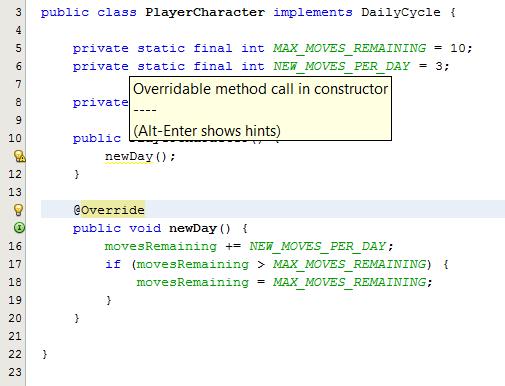
NetBeans will warn you not to call an overridable method from your constructor, and for good reason ...
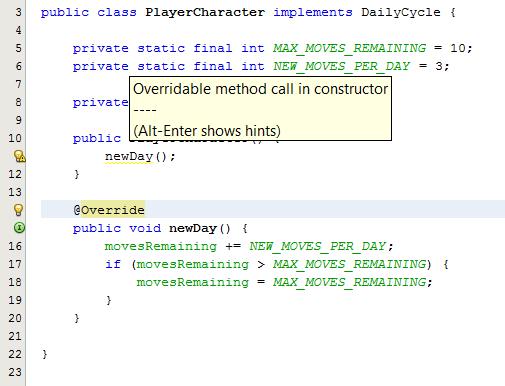

This not only solves the warning, but actually solves the problem. The object is no longer allowing subclasses to inject out-of-sequence code into the constructor by overriding a method.
How do other people handle this? Is there a standard pattern?
public class PlayerCharacter implements DailyCycle {

    private static final int MAX_MOVES_REMAINING = 10;
    private static final int NEW_MOVES_PER_DAY = 3;

    private int movesRemaining;

    public PlayerCharacter() {
        newDay(); // WARNING
    }

    @Override
    public void newDay() {
        movesRemaining += NEW_MOVES_PER_DAY;
        if (movesRemaining > MAX_MOVES_REMAINING) {
            movesRemaining = MAX_MOVES_REMAINING;
        }
    }

}
What I Do...
I'm not really sure how other people handle this, but like to make a local version of the method (CTRL-SHIFT-M in NetBeans)...
public class PlayerCharacter implements DailyCycle {

    private static final int MAX_MOVES_REMAINING = 10;
    private static final int NEW_MOVES_PER_DAY = 3;

    private int movesRemaining;

    public PlayerCharacter() {
        newDayLocal();
    }

    @Override
    public void newDay() {
        newDayLocal();
    }

    private void newDayLocal() {
        movesRemaining += NEW_MOVES_PER_DAY;
        if (movesRemaining > MAX_MOVES_REMAINING) {
            movesRemaining = MAX_MOVES_REMAINING;
        }
    }

}
This not only solves the warning, but actually solves the problem. The object is no longer allowing subclasses to inject out-of-sequence code into the constructor by overriding a method.
How do other people handle this? Is there a standard pattern?
Tuesday, May 7, 2013
Case Insensitive Map
I use Maps often, especially using a String as the key. Working with database fields, there are times when I wished that String was case insensitive. So I used a couple of LinkedHashMap objects to implement my own...
Usage:
It preserves the original capitalization of the keys while maintaining the efficiency of the hash lookups, but the lookups are case insensitive.
Source:
Usage:
Map<String, Object> myMap = new CaseInsensitiveLinkedHashMap<Object>()
Object o1 = new Object();
myMap.put("id7", o1);
Object o2 = myMap.get("ID7");
System.out.println(o1==o2 ? "success" : "failure"); // prints "success"

// end
It preserves the original capitalization of the keys while maintaining the efficiency of the hash lookups, but the lookups are case insensitive.
Source:
package util;

import java.util.*;

/**
 * allows you to create a Map<String, ?> where the String key is case insensitive.
 * @author Jonathan
 */
public final class CaseInsensitiveLinkedHashMap<T> implements Map<String, T> {

    private final Map<String, String> keys;
    private final Map<String, T> values;

    public CaseInsensitiveLinkedHashMap() {
        keys = new LinkedHashMap<String, String>();
        values = new LinkedHashMap<String, T>();
    }

    public CaseInsensitiveLinkedHashMap(int initialCapacity) {
        keys = new LinkedHashMap<String, String>(initialCapacity);
        values = new LinkedHashMap<String, T>(initialCapacity);
    }

    public CaseInsensitiveLinkedHashMap(int initialCapacity, float loadFactor) {
        keys = new LinkedHashMap<String, String>(initialCapacity, loadFactor);
        values = new LinkedHashMap<String, T>(initialCapacity, loadFactor);
    }

    public CaseInsensitiveLinkedHashMap(int initialCapacity, float loadFactor, boolean accessOrder) {
        keys = new LinkedHashMap<String, String>(initialCapacity, loadFactor, accessOrder);
        values = new LinkedHashMap<String, T>(initialCapacity, loadFactor, accessOrder);
    }

    public CaseInsensitiveLinkedHashMap(Map<? extends String, ? extends T> initialValues) {
        this(initialValues.size());
        for (Entry<? extends String, ? extends T> entry : initialValues.entrySet()) {
            put(entry.getKey(), entry.getValue());
        }
    }

    @Override
    public boolean containsKey(Object key) {
        return containsKey(key.toString());
    }

    public boolean containsKey(String key) {
        return values.containsKey(key.toLowerCase());
    }

    @Override
    public T get(Object key) {
        return get(key.toString());
    }

    public T get(String key) {
        return values.get(key.toLowerCase());
    }

    @Override
    public T put(String key, T value) {
        final String lowerCaseKey = key.toLowerCase();
        keys.put(lowerCaseKey, key);
        return values.put(lowerCaseKey, value);
    }

    @Override
    public T remove(Object key) {
        return remove(key.toString());
    }

    public T remove(String key) {
        final String lowerCaseKey = key.toLowerCase();
        keys.remove(lowerCaseKey);
        return values.remove(lowerCaseKey);
    }

    @Override
    public void putAll(Map<? extends String, ? extends T> m) {
        for (Entry<? extends String, ? extends T> entry : m.entrySet()) {
            put(entry.getKey(), entry.getValue());
        }
    }

    @Override
    public void clear() {
        keys.clear();
        values.clear();
    }

    @Override
    public Set<String> keySet() {
        return new LinkedHashSet<String>(keys.values());
    }

    @Override
    public Collection<T> values() {
        return values.values();
    }

    @Override
    public Set<Entry<String, T>> entrySet() {
        Set<Entry<String, T>> set = new LinkedHashSet<Entry<String, T>>();
        for (final String keyLowerCase : keys.keySet()) {
            Entry<String, T> entry = new Entry<String, T>() {

                final String key = keys.get(keyLowerCase);

                @Override
                public String getKey() {
                    return key;
                }

                @Override
                public T getValue() {
                    if (containsKey(key)) {
                        return get(key);
                    }
                    return null;
                }

                @Override
                public T setValue(T value) {
                    return put(key, value);
                }

            };
            set.add(entry);
        }
        return set;
    }

    @Override
    public int size() {
        return values.size();
    }

    @Override
    public boolean isEmpty() {
        return values.isEmpty();
    }

    @Override
    public boolean containsValue(Object value) {
        return values.containsValue(value);
    }

}

// end
Thursday, March 14, 2013
Auto Resize Columns in a JTable (Java Swing)
Here's some code to automatically resize columns in a Java Swing JTable, based on the data in that table...
Usage:
Source:
Usage:
        templatesTable.setModel(tableModel);
        UserInterfaceUtility.resizeColumns(templatesTable);
Source:
package ui;

import java.util.ArrayList;
import java.util.List;
import javax.swing.JTable;
import javax.swing.table.TableColumnModel;
import javax.swing.table.TableModel;

/**
 * http://javajon.blogspot.com/
 * @author Jonathan
 */
public class UserInterfaceUtility {

    /**
     * resizes the columns in a JTable based on the data in that table. data
     * scanned is limited to the first 25 rows.
     *
     * @param table the table with the columns to resize
     */
    public static void resizeColumns(JTable table) {

        final TableModel model = table.getModel();
        final int columnCount = model.getColumnCount();
        final int rowCount = model.getRowCount();
        final List charactersPerColumn = new ArrayList();

        // initiazlize character counts
        final Integer integerZero = Integer.valueOf(0);
        for (int col = 0; col < columnCount; col++) {
            charactersPerColumn.add(integerZero);
        }

        // scan first 25 rows
        final int rowsToScan = (rowCount < 25) ? rowCount : 25;
        for (int row = 0; row < rowsToScan; row++) {
            for (int col = 0; col < columnCount; col++) {

                // character counts for comparison
                final int existingCharacterCount = charactersPerColumn.get(col).intValue();
                final Object cellValue = model.getValueAt(row, col);
                if (cellValue != null) {
                    final Integer newCharacterCount = Integer.valueOf(cellValue.toString().length());

                    // do we need to increase the character count?
                    if (newCharacterCount.intValue() > existingCharacterCount) {
                        charactersPerColumn.set(col, newCharacterCount);
                    }
                }

            }
        }

        // prepare the table for column resizing
        final TableColumnModel columnModel = table.getColumnModel();
        table.setAutoResizeMode(JTable.AUTO_RESIZE_OFF);

        // set maximum character counts
        final Integer maximumCharacterCount = Integer.valueOf(24);
        for (int col = 0; col < columnCount; col++) {
            final int existingCharacterCount = charactersPerColumn.get(col).intValue();
            if (existingCharacterCount > maximumCharacterCount.intValue()) {
                charactersPerColumn.set(col, maximumCharacterCount);
            }
        }

        // set column widths
        for (int col = 0; col < columnCount; col++) {
            final int existingCharacterCount = charactersPerColumn.get(col).intValue();
            final int columnWidth = 18 + (existingCharacterCount * 7);
            columnModel.getColumn(col).setPreferredWidth(columnWidth);
        }

    }
}
Saturday, January 26, 2013
Calling Java 7 from Cold Fusion
I tried calling Java 7 objects from Cold Fusion10 today and I got nothing ... Literally, nothing. At the CFOBJECT tag, the script would just die. No error message. Nothing in the log files. Just nothing.
I made a Java 7 object, one class, one method, nothing special...Same results. Then I converted that project (one class) to JDK 6, and poof! The same object compiled using JDK6 works fine!
http://blogs.coldfusion.com/post.cfm/java-7-support-for-coldfusion
The above article states that CF 9 and 10 will support Java 7 through updates by February 2013 ... we'll we're getting close. I just downloaded all the updates and ...
Fail!
Even with all updates applied, the script just dies when i try to call Java 7 objects from CF 10. So now I've got all of this code written for JDK7, and I need to call it from CF10 ... What to do ... Looks like I might be converting a lot of code written for JDK7 to work with JDK6, which sucks, because I like try-with-resources, and I like the diamond operator ... a lot :(
I made a Java 7 object, one class, one method, nothing special...Same results. Then I converted that project (one class) to JDK 6, and poof! The same object compiled using JDK6 works fine!
http://blogs.coldfusion.com/post.cfm/java-7-support-for-coldfusion
The above article states that CF 9 and 10 will support Java 7 through updates by February 2013 ... we'll we're getting close. I just downloaded all the updates and ...
Fail!
Even with all updates applied, the script just dies when i try to call Java 7 objects from CF 10. So now I've got all of this code written for JDK7, and I need to call it from CF10 ... What to do ... Looks like I might be converting a lot of code written for JDK7 to work with JDK6, which sucks, because I like try-with-resources, and I like the diamond operator ... a lot :(
Sunday, October 21, 2012
MySQL ALTER TABLE ADD COLUMN IF NOT EXISTS
I wrote a MySQL function and procedure that will add a database column unless it exists already. The following code would add 3 fields to the template table, unless they already exist:
-- add fields to template table to support ignoring extra data
-- at the top/bottom of every page

CALL addFieldIfNotExists ('template', 'firstPageHeaderEndY', 'INT NOT NULL DEFAULT 0');
CALL addFieldIfNotExists ('template', 'pageHeaderEndY', 'INT NOT NULL DEFAULT 0');
CALL addFieldIfNotExists ('template', 'pageFooterBeginY', 'INT NOT NULL DEFAULT 792');
Here is the actual code for the above procedure:
DELIMITER $$

DROP PROCEDURE IF EXISTS addFieldIfNotExists
$$

DROP FUNCTION IF EXISTS isFieldExisting
$$

CREATE FUNCTION isFieldExisting (table_name_IN VARCHAR(100), field_name_IN VARCHAR(100))
RETURNS INT
RETURN (
    SELECT COUNT(COLUMN_NAME)
    FROM INFORMATION_SCHEMA.columns
    WHERE TABLE_SCHEMA = DATABASE()
    AND TABLE_NAME = table_name_IN
    AND COLUMN_NAME = field_name_IN
)
$$

CREATE PROCEDURE addFieldIfNotExists (
    IN table_name_IN VARCHAR(100)
    , IN field_name_IN VARCHAR(100)
    , IN field_definition_IN VARCHAR(100)
)
BEGIN

    -- http://javajon.blogspot.com/2012/10/mysql-alter-table-add-column-if-not.html

    SET @isFieldThere = isFieldExisting(table_name_IN, field_name_IN);
    IF (@isFieldThere = 0) THEN

        SET @ddl = CONCAT('ALTER TABLE ', table_name_IN);
        SET @ddl = CONCAT(@ddl, ' ', 'ADD COLUMN') ;
        SET @ddl = CONCAT(@ddl, ' ', field_name_IN);
        SET @ddl = CONCAT(@ddl, ' ', field_definition_IN);

        PREPARE stmt FROM @ddl;
        EXECUTE stmt;
        DEALLOCATE PREPARE stmt;

    END IF;

END;
$$
Monday, October 15, 2012
NetBeans Writes My Code for Me
I'm a big fan of Eclipse. I use it for Perl, PHP, HTML, CSS, JavaScript, ColdFusion ... but when it comes to hardcore Java development, I prefer NetBeans. NetBeans refactoring tools are superb, and these are the ones I use the most:


ALT+ENTER for red and yellow squiggly underlines.
NetBeans reports all kinds of hints and errors as you're coding with little yellow and ride lines. Red lines usually mean it won't compile. Yellow lines usually indicate a coding style suggestion.
Either way pressing ALT+ENTER will usually provide me with options.
Refactor > Encapsulate Fields
Most classes need getters and setters. NetBeans writes them for me.
ALT+INSERT for more code writing magic
Alt+Insert gives me a menu of things that the IDE can generate for you. I use it mostly for constructors and override methods.Instant JavaDocs
Event though JavaDocs come before the classes and methods they describe, if I define my method first, the JavaDocs will write more of the documentation for me. I put my cursor on the line above the method...
I type /** and press ENTER.
NetBeans writes as much of the JavaDoc as it can based on what it knows about the method. Then I fill in the rest...
More!
CTRL+SPACE for autocomplete. I use it everywhere. In fact, when I use it in a class but not in a method, it provides me a menu similar to ALT+INSERT where it will actually write constructors and override methods for me.
CTRL+R allows me to refactor and rename anything. I have to be careful when I use this on a shared code repository. It's easy to cause conflicts.
CTRL+B takes me to the definition of anything, method, class, enum, etc.
ALT+F7 tells me every place a class, interface or method is used. This one is my favorite.
Monday, June 25, 2012
BigDecimal equals ZERO
So I've read that .equals() may not always work on a BigDecimal value, and that I should use .compareTo() instead, but I guess I never really believed it before, until today.
The above code demonstrates one instance in which .compareTo will work when .equals will fail.
.
The value of y is "0.0" where BigDecimal.ZERO is actually "0", which you and I both know is the same number but because the scale of y is now 1, y is considered a different BigDecmal than ZERO. If you set the scale of both variables to the same, then .equals will work again, but at that point isn't easier to simply use .compareTo?
package sandbox;
import java.math.BigDecimal;
public class BigDecimalEqualsCompareTo {

    public static void main(String[] args) {

        BigDecimal x = BigDecimal.ZERO;
        BigDecimal y = BigDecimal.valueOf((double) 0);

        x = x.add(y);

        if (x.equals(BigDecimal.ZERO)) {
            System.out.println(".equals worked!");
        }
        else {
            System.out.println(".equals FAILED!");
        }

        if (x.compareTo(BigDecimal.ZERO) == 0) {
            System.out.println(".compareTo worked!");
        }
        else {
            System.out.println(".compareTo FAILED!");
        }

    }

}
run:
.equals FAILED!
.compareTo worked!
.
The above code demonstrates one instance in which .compareTo will work when .equals will fail.
.
The value of y is "0.0" where BigDecimal.ZERO is actually "0", which you and I both know is the same number but because the scale of y is now 1, y is considered a different BigDecmal than ZERO. If you set the scale of both variables to the same, then .equals will work again, but at that point isn't easier to simply use .compareTo?
Monday, June 18, 2012
Before I Ask for Help
I think in any workplace environment there is a continuum of productivity versus courtesy that could improve relations when considered prior to asking another for assistance. If I'm rushing out to bother my coworkers as soon as I find something I don't understand, I'm not only reducing their productivity while running the risk of annoying them, I'm depriving myself of an opportunity to learn. On the other hand, if I spend days trying to solve a problem that I could have had solved in fifteen minutes if I had asked for help, then I'm wasting my time and costing the company money, which in the long run means there's less money for our salaries, raises, etc. It hurts us all. So how do I know where to draw the line?
For me, the checklist below serves to help me make sure I've put forth a reasonable effort to solve a problem on my own before I reach out for assistance from others:
1. I read the error message. (if there is one)
NetBeans and Eclipse both provide pretty detailed error messages, and although some of them may seem cryptic to those new to Java, familiarity with these messages will increase my productivity in the long run.
2. I try to find relevant code.
Is there already code somewhere else in the project that does something similar to what I'm trying to accomplish? Can I go read that code and see if I can figure out what I'm doing wrong? Can I refactor the existing code into a reusable method or class and just use that rather than reinventing the wheel? What else is out there?
3. I search the internet.
My favorite search engine is Google. I start with the technology I'm using, then a few keywords that I think are relevant to the problem I'm trying to solve, and if that doesn't work I try using a different set of words to search for an answer. If there's an error message, I'll often type or even copy/paste the error message into Google, removing any words that are specific to my project code.
4. I review the context.
Often times the cause of a problem is located elsewhere in code from where the problem is occurring. I make sure I understand the code I'm working on. If there are variables or methods I don't understand I find out where they are declared. Eclipse and NetBeans both offer shortcut keys to navigate the code for me, so I learn them (F3 and CTRL+B). I find where my fields, methods and classes are used (CTRL+SHIFT+G and ALT+F7). Most of all I make sure I understand the code I'm working with to the best of my ability before I ask for help with it.
5. I try the debugger. (if possible)
Whenever possible I'll step through the code and watch the variables to see what's going on under the covers. Sometimes I'll add some variables into the code a bit to make debugging easier.
6. I try the documentation.
If my internet searches didn't bring me there already, I try the documentation for the commands I'm using. In NetBeans, ALT+F1 will bring me to javadocs. If not, I can type into google the name of the technology and the class and possibly the method for which I'm i'm looking. If my question is about SQL or another technololgy it helps to be specific. For example, if I'm using PostgreSQL "PostgreSQL CREATE TABLE" will give me better results than just "CREATE TABLE".
7. I walk down the stack trace. (if there is one)
If I'm lucky enough to have a stack trace, I'll look at more than just one place in code from which the error originated. A null pointer exception often occurs because a null value was passed into a routine four levels up the stack, but the object is never used so the error doesn't occur until we're far, far away from the offending variable. It helps to keep looking.
If I've done all (or most) of the above, it's probably taken me about two hours to try to figure this out on my own. If I've spent at least two hours trying to solve my problem then I could consider asking for help, but honestly that depends on whether or not I've reached a dead end. In most programming environments if I have internet access I have the resources I need to solve the problem at hand. Legitimately, then, questions may arise from the data model or software architecture that we've chosen to implement. If it's proprietary and I don't understand it, then it makes sense to ask.
Hope this helps!
For me, the checklist below serves to help me make sure I've put forth a reasonable effort to solve a problem on my own before I reach out for assistance from others:
Before I ask for help...
(in any order)NetBeans and Eclipse both provide pretty detailed error messages, and although some of them may seem cryptic to those new to Java, familiarity with these messages will increase my productivity in the long run.
2. I try to find relevant code.
Is there already code somewhere else in the project that does something similar to what I'm trying to accomplish? Can I go read that code and see if I can figure out what I'm doing wrong? Can I refactor the existing code into a reusable method or class and just use that rather than reinventing the wheel? What else is out there?
3. I search the internet.
My favorite search engine is Google. I start with the technology I'm using, then a few keywords that I think are relevant to the problem I'm trying to solve, and if that doesn't work I try using a different set of words to search for an answer. If there's an error message, I'll often type or even copy/paste the error message into Google, removing any words that are specific to my project code.
4. I review the context.
Often times the cause of a problem is located elsewhere in code from where the problem is occurring. I make sure I understand the code I'm working on. If there are variables or methods I don't understand I find out where they are declared. Eclipse and NetBeans both offer shortcut keys to navigate the code for me, so I learn them (F3 and CTRL+B). I find where my fields, methods and classes are used (CTRL+SHIFT+G and ALT+F7). Most of all I make sure I understand the code I'm working with to the best of my ability before I ask for help with it.
5. I try the debugger. (if possible)
Whenever possible I'll step through the code and watch the variables to see what's going on under the covers. Sometimes I'll add some variables into the code a bit to make debugging easier.
6. I try the documentation.
If my internet searches didn't bring me there already, I try the documentation for the commands I'm using. In NetBeans, ALT+F1 will bring me to javadocs. If not, I can type into google the name of the technology and the class and possibly the method for which I'm i'm looking. If my question is about SQL or another technololgy it helps to be specific. For example, if I'm using PostgreSQL "PostgreSQL CREATE TABLE" will give me better results than just "CREATE TABLE".
7. I walk down the stack trace. (if there is one)
If I'm lucky enough to have a stack trace, I'll look at more than just one place in code from which the error originated. A null pointer exception often occurs because a null value was passed into a routine four levels up the stack, but the object is never used so the error doesn't occur until we're far, far away from the offending variable. It helps to keep looking.
If I've done all (or most) of the above, it's probably taken me about two hours to try to figure this out on my own. If I've spent at least two hours trying to solve my problem then I could consider asking for help, but honestly that depends on whether or not I've reached a dead end. In most programming environments if I have internet access I have the resources I need to solve the problem at hand. Legitimately, then, questions may arise from the data model or software architecture that we've chosen to implement. If it's proprietary and I don't understand it, then it makes sense to ask.
Hope this helps!
Friday, June 15, 2012
for loops - arrays and lists
Dedicated to my coworkers who are transitioning from HIBOL to Java. I respect your courage.
So the basic gist of this post is that all of the following examples do basically the same thing. That way we can see what's similar and different. Hopefully this will help us all better understand the for loop.
note that the for/in loop syntax is exactly the same for looping through an array as it is for looping through a list:
Technically, any class that implements the Iterable interface can be used in a for/in statement, but we'll save that discussion for another day :)
So the basic gist of this post is that all of the following examples do basically the same thing. That way we can see what's similar and different. Hopefully this will help us all better understand the for loop.
while - loop through an array
        String[] names = new String[] { "Joe", "Sally", "Henry" };

        int i = 0;
        while (i < names.length) {
            System.out.println(names[i]);
            i++;
        }
run:
Joe
Sally
Henry
for - loop through an array
        String[] names = new String[] { "Joe", "Sally", "Henry" };

        for (int i = 0; i < names.length; i++) {
            System.out.println(names[i]);
        }
run:
Joe
Sally
Henry
for/in - loop through an array
        String[] names = new String[] { "Joe", "Sally", "Henry" };

        for (String s : names) {
            System.out.println(s);
        }
run:
Joe
Sally
Henry
while - loop through a list
        java.util.List names = new java.util.ArrayList();
        names.add("Joe");
        names.add("Sally");
        names.add("Henry");

        int i = 0;
        while (i < names.size()) {
            System.out.println(names.get(i));
            i++;
        }
run:
Joe
Sally
Henry
for - loop through a list
        java.util.List names = new java.util.ArrayList();
        names.add("Joe");
        names.add("Sally");
        names.add("Henry");

        for (int i = 0; i < names.size(); i++) {
            System.out.println(names.get(i));
        }
run:
Joe
Sally
Henry
for/in - loop through a list
        java.util.List names = new java.util.ArrayList();
        names.add("Joe");
        names.add("Sally");
        names.add("Henry");

        for (String s : names) {
            System.out.println(s);
        }
run:
Joe
Sally
Henry
note that the for/in loop syntax is exactly the same for looping through an array as it is for looping through a list:
        for (String s : names) {
            System.out.println(s);
        }
Technically, any class that implements the Iterable interface can be used in a for/in statement, but we'll save that discussion for another day :)
Subscribe to:
Posts (Atom)